Payments
WorldPay card-not-present payments will be available to all U.S. customers.
Your Bravo catch-up
Bravo keeps improving. Catch up on performance improvements, new features, and easier everyday workflows.
Counter Talk with Tally / 2 min 48 sec
Join Tally for a quick look at what changed in the October Release.
November 5, 2026 / Minor Release
Rollout begins November 5, 2026. This minor Bravo release brings payment availability updates and improvements to online selling, inventory, and everyday store operations.
WorldPay card-not-present payments will be available to all U.S. customers.
Replication fixes and further listing sync improvements across eBay, Buya, and Company Branded Websites.
Validation of converted-item recognition improvements in Physical Inventory, plus AI invoice imports into existing SKUs.
Fixes for firearm listings on Company Branded Websites and a separate eBay “Make an Offer” setting.
Fixes for denomination display, multi-store inventory reporting, and Bravo Chat sign-in.
Product Update / e4473
Bravo already supported suppressors. The expanded e4473 workflow now lets you include suppressors, any other weapons (AOWs), short-barreled rifles (SBRs), and short-barreled shotguns (SBSs) alongside other firearms on the same e4473.
ATF's October 9, 2026 guidance changes enforcement of certain federal NFA approval and registration requirements for suppressors. Form 4473, applicable background checks, transaction records, state and local restrictions, and applicable dealer special occupational taxes still matter. This is not a guarantee of same-day transfer.
Questions About the Expanded e4473 Workflow? Call (725) 525-3535 to discuss your store's workflow with our team.
October release / Speed & performance
The October release includes performance improvements designed to make Bravo faster and easier to use. Alongside the new features, we are continuing to improve the software your team relies on every day.
Catch up on what you may have missed. Explore the updates below, from customer conversations inside Bravo to inventory reordering and everyday tasks.
Featured walkthrough · Document Import
See Invoice Import powered by Bravo SuperIntelligence. Review extracted details and correct anything that needs attention before receiving.
Open video ↗Released / October 28, 2026
Performance, everyday tasks, and customer conversations in Bravo.
Released October 28 / Mobile messaging
Your customer starts the conversation in MobilePawn or the Buya App. Your team replies directly from Bravo.
Free with MobilePawn & the Buya App
Once your customer sends a message, employees can respond directly inside Bravo without opening Shopkeeper. Shopkeeper is not required. Chat is free with both MobilePawn and the Buya App.
Route pawn notices to a dedicated printer instead of switching paper by hand.
Record how many of each bill you have when counting your till or safe, so your cash records include the details behind the total.
Choose “None” and go straight to describing the item. There’s no need to create a manufacturer or model just to finish the ticket. Improved search and categories make items easier to enter, too.
Released October 28: employees can select Forgot Password on the login screen. A manager with override rights approves the request, then the employee sets a new password. No backend employee-settings access is needed.
Watch Billy walk through the new password reset.
Access loans and buys from one screen, with quicker access and fewer steps to place items on hold.
Customer lost their ticket? Set the lost-ticket fee to $0.00 and print a replacement without adding a charge.
South Carolina stores can send early pawn notices through Bravo to help manage their notice requirements.
This release includes performance updates designed to make Bravo faster and easier to use throughout your day.
The first time you open Bravo after an update, you’ll see what’s new and where to learn more. No need to dig through your inbox.
Run separate physical inventory audits for repair items and rental items, rather than mixing them into one count.
Adding several serialized items from the same importer? Bravo remembers your last entry so you don’t have to type it again for every item.
Sell on eBay or your Company-Branded Website without being required to list those items on Buya.
Separate settings make each marketplace’s shipping options clearer. Calculated shipping works on eBay, not on Buya.
Improved online-sales tracking and accounting exports help you review sales activity and tax liabilities.
See an alert on your Bravo dashboard when an item reaches its reorder threshold. Open a purchase order with suggested quantities already filled in, ready for you to review.
The secondary response date starts blank so your team enters the appropriate date instead of accidentally saving a prefilled one.
When the address on the e4473 is correct, a new button lets your team update the customer’s Bravo address from the form.
Upload required supporting documents earlier in the e4473 process, rather than reaching the end and realizing you still need paperwork from your customer.
Give designated employees permission to approve waiting-period overrides for qualifying CCW transactions, instead of waiting for a manager every time.
Use this permission for transactions that qualify for a waiting-period exception under your state’s requirements.
Already using Bravo? Turn on the new CVV fraud-protection setting if you’d like the extra protection. It stays off for your store until you enable it.
For new Bravo customers, the setting is on by default. Your Bravo rep can help you get started.
October release / NFA items
Watch the NFA item update in Bravo.
Follow the on-screen steps for changing an NFA item’s SKU category. Silent walkthrough · 58 seconds.
Move items in bulk by karat type and add precious-metal or stone details without completing a full assessment.
Resources / Reports
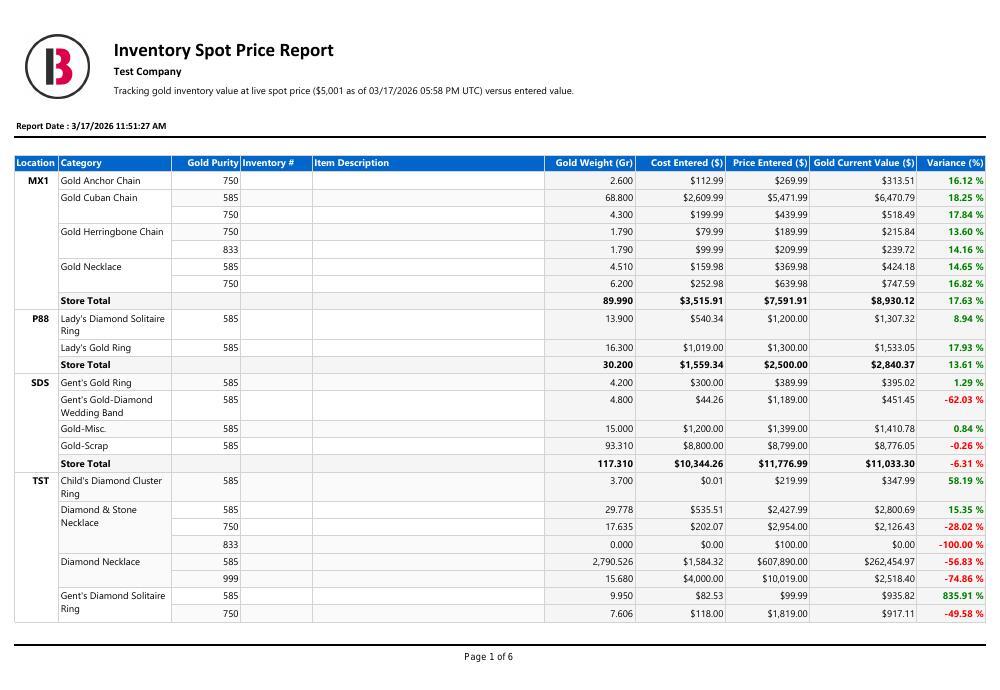
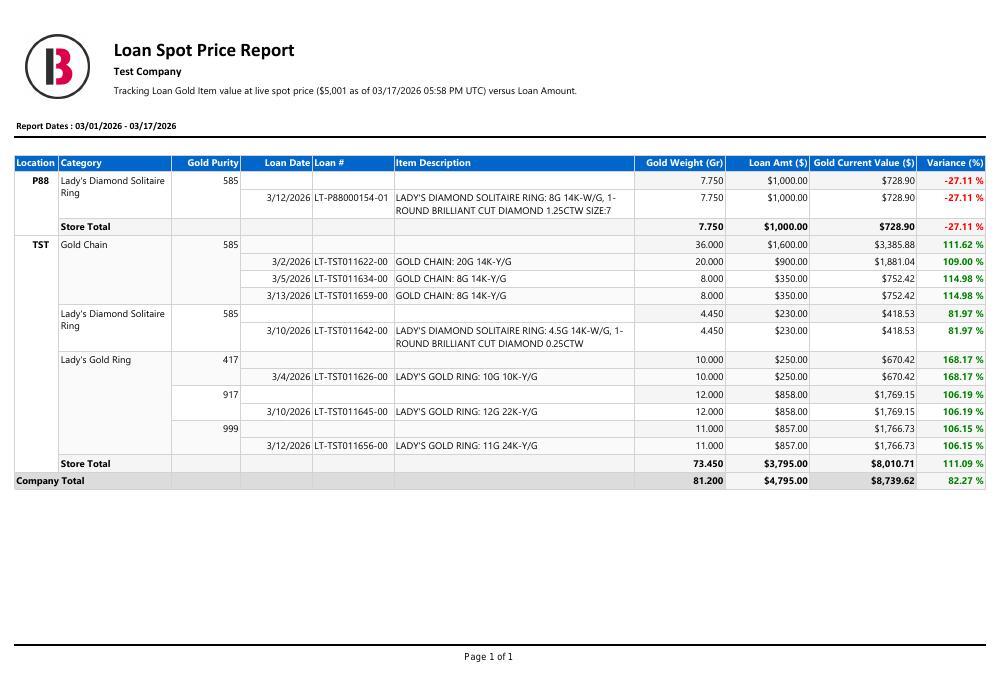
Checking the gold in your store or making sense of sales and tax? Start with a sample report or follow along with us.
Compare your entered gold inventory value or the gold value in your loan book with its value at live spot price. Both reports are part of Bravo Reporting Pro.
Review sales activity and tax collected over a date range for a clearer view of sales figures and tax liability.
For Existing Bravo Customers
November 1–30, 2026Coming November 1. Ask about eligibility now.
Loan Payments. From Their Phones.
Give customers a convenient way to make loan payments with MobilePawn.

MobilePawn only. This offer does not apply to the Buya App.
Still Handing Customers a Paper 4473?
Let customers complete Form 4473 digitally. Your team reviews each form.
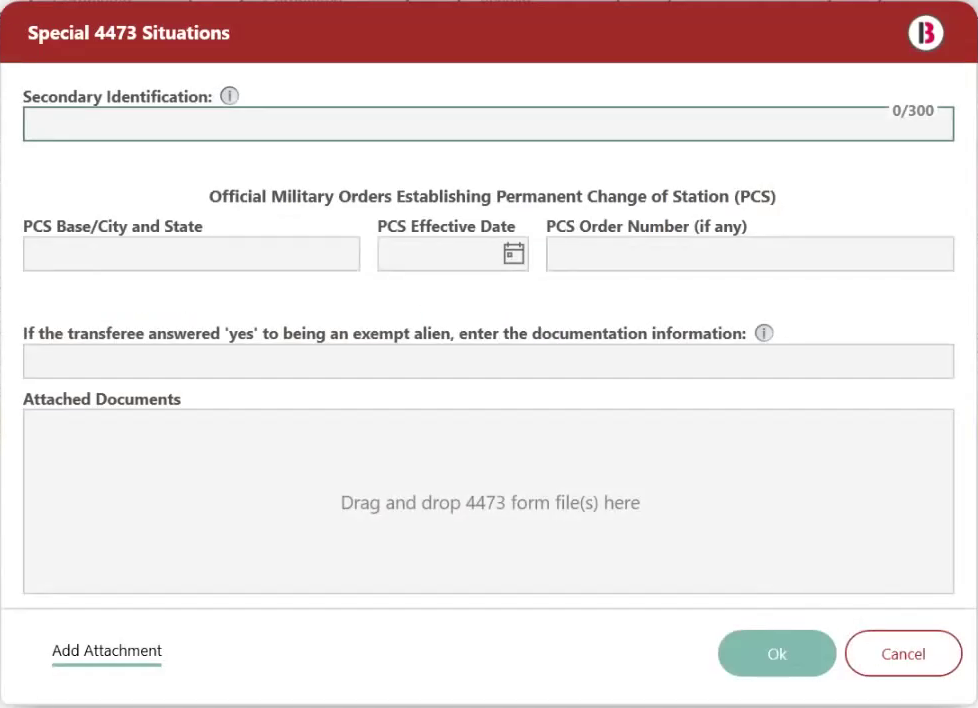
Digital forms only. Cloud Storage is excluded.
Slow Day? Give Customers a Reason to Come Back.
Send store promotions and coupons by text with Mobile Messenger.
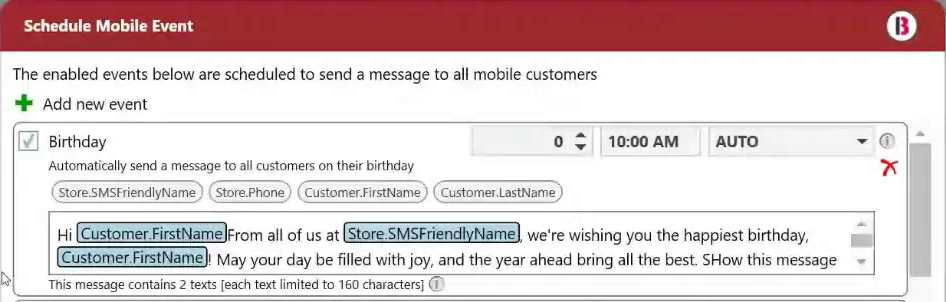
Coupons & Promotions must be added with new Messenger. $0.07 per billable marketing text still applies.
Offers run November 1–30, 2026, inclusive. For existing Bravo customers adding a feature not already enabled. No credits for existing services. Your representative will confirm eligibility.
An inquiry does not activate a service.